

Allied Mechanical Solution

Inspect, approve and certify site equipment, in one app.

Allied Mechanical Solution inspects and certifies cranes, hoists and site machinery. Devphant built their platform end to end: a mobile app for inspection engineers, an admin console with maker checker approvals, and an app where customers see and download every equipment certificate.

Android & iOS appAdmin web consoleMaker checker workflowDigital certificatesQR equipment tags
Visit Allied Live on Google Play Live on the App Store
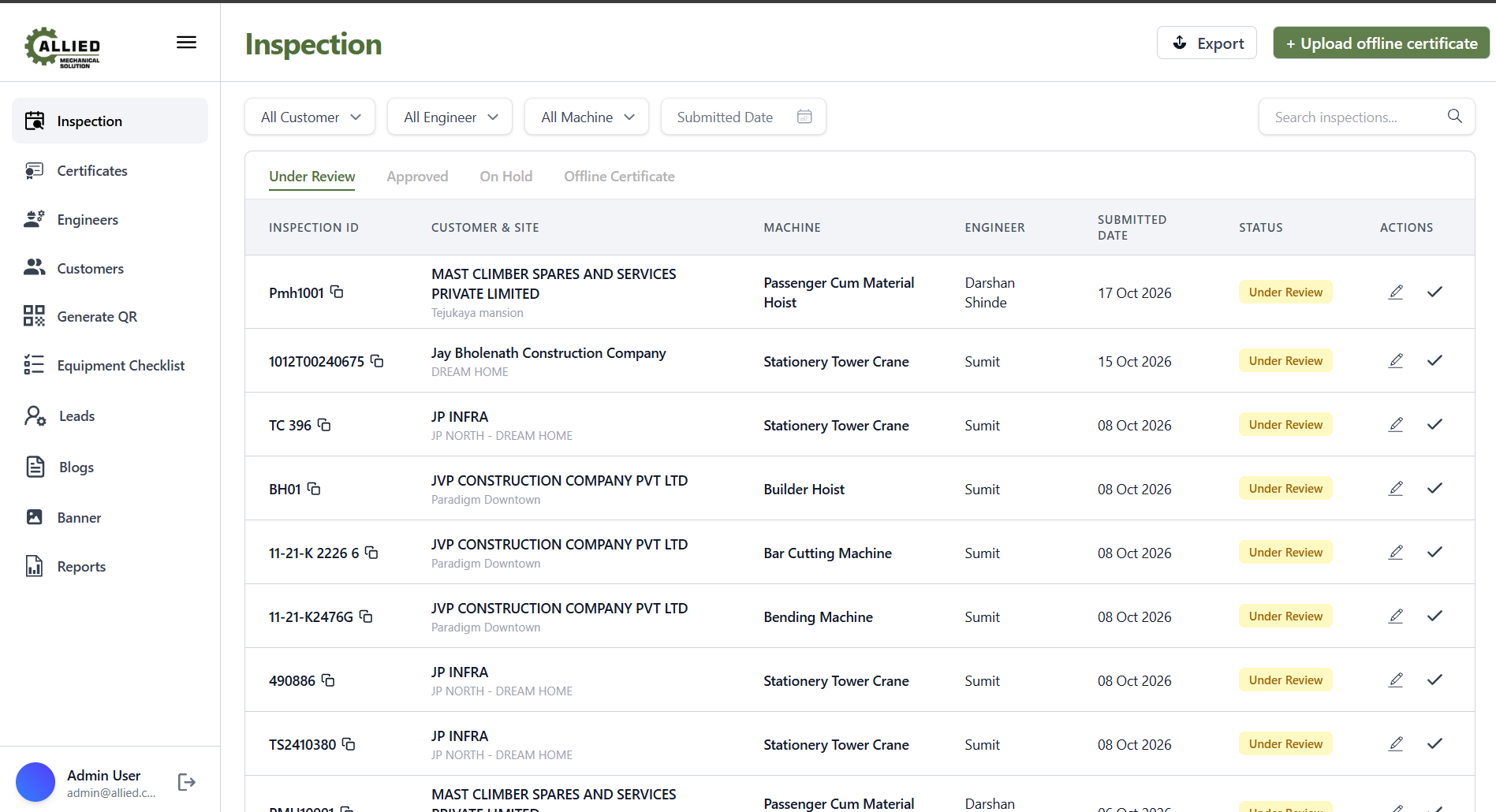
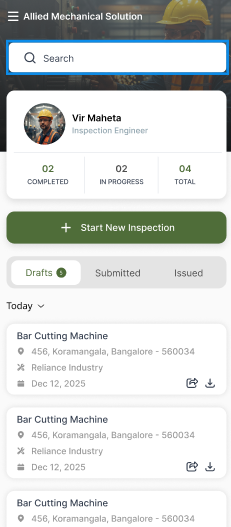
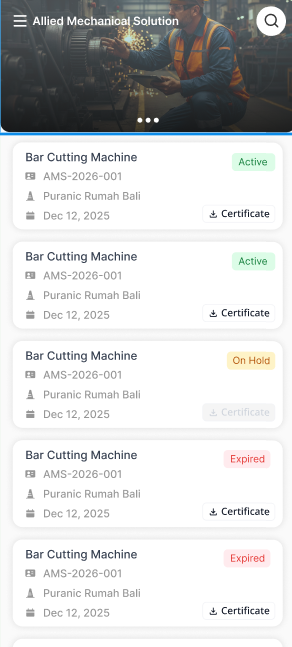
Allied admin console listing inspections under review with customer, machine, engineer, date and approve actions Engineer app home with inspection counts, Start New Inspection button and draft inspections Customer app listing equipment certificates as Active, On Hold or Expired with download buttons
Apps in one platform
3
Users
Engineers · Admins · Customers
Platforms
Android · iOS · Web
Workflow
Maker → Checker → Certificate

The challenge

Equipment inspections usually live on paper checklists, phone photos and PDFs sent over email.

For an inspection and certification firm, that makes it hard to answer the questions that matter: which machine was checked, by whom, who approved it, and is its certificate still valid? Allied needed one system where every inspection is recorded on site, reviewed by a second person, and turned into a certificate the customer can access any time.

How it works

A maker checker workflow, built for the field.

  1. 01 · MAKER

    Engineer inspects

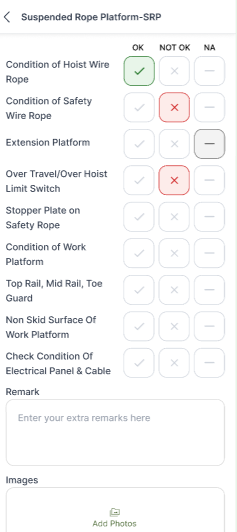
    On site, the engineer opens the machine's checklist and marks every item OK, Not OK or N/A, with remarks and photos.

  2. 02 · SUBMIT

    Sent for review

    Drafts move to Submitted and land in the admin's Under Review queue with customer, site and machine attached.

  3. 03 · CHECKER

    Admin approves or denies

    A second person reviews the inspection and approves it, edits it, or puts it on hold. Nothing is certified by one person alone.

  4. 04 · CERTIFY

    Customer gets the certificate

    Approved inspections become certificates the customer sees in their app as Active, On Hold or Expired, ready to download.

What we built

Three apps, one source of truth.

Engineer app · Maker

Inspect on site

  • Personal dashboard: completed, in progress, total
  • Start a new inspection in one tap
  • Machine specific checklists with OK / Not OK / N/A
  • Remarks and photos as evidence
  • Drafts, Submitted and Issued tabs
Checklist for a Suspended Rope Platform with OK, Not OK and NA for each item
Customer app

See every certificate

  • All equipment and certificates in one list
  • Clear status: Active, On Hold, Expired
  • Download certificates any time
  • Equipment ID and site for every machine
Customer certificate list
Admin console · Checker

Review, approve and run the business

Under Review · Approved · On HoldFilters by customer, engineer, machine, dateOffline certificate uploadEngineers & customersEquipment checklistsGenerate QRExport & reports
Admin inspection queue with filters and approve actions

Inspection software, built for you

Manage quality inspections? We can build yours.

The same platform works for any team that inspects equipment, assets or sites: digital checklists in the field, a second person approval, and certificates or reports your customers can trust.

Build my inspection app
  • Inspection & certification agenciesThird party inspections, load tests and certificates.
  • Construction & infrastructureCranes, hoists and site machinery safety checks.
  • Manufacturing QAMachine condition and quality control audits.
  • Equipment rentalCheckout and return inspections for every asset.
  • Facility managementLifts, fire systems and building audits.
  • Oil, gas & energySafety and compliance inspections on plant.

Inspection app FAQ

What is a maker checker inspection app?

One person (the maker, usually the field engineer) records the inspection, and a second person (the checker, usually an admin) reviews and approves it before any certificate is issued. It reduces errors and creates a clear audit trail.

Can each machine have its own checklist?

Yes. Admins manage equipment checklists, so a tower crane, a builder hoist and a rope platform each get the right inspection points.

How do customers get their certificates?

Once approved, certificates appear in the customer app with their status, and can be downloaded at any time.

How long does it take to build an inspection app?

Devphant ships a first working version in 4 weeks: checklists, approvals and certificates, live on the app stores. More modules follow in 4 week releases.

What Devphant delivered

Product strategyUI/UX designAndroid & iOS appsAdmin web consoleMaker checker approvalsDigital certificatesQR equipment taggingPlay Store & App Store launch