

How AI agents actually work, explained with the modern AI stack
An agent is a model in a loop, with tools, memory and rules. Here is every layer, what it does, and the tools teams use at each one.
A chatbot answers. An agent gets things done. Ask a chatbot to book a demo and it tells you how. Ask an agent and it checks the calendar, picks a slot, creates the meeting, updates the CRM and confirms with the customer.
The difference is not magic. It is a simple loop, and a stack of parts around it.
The loop at the heart of every agent
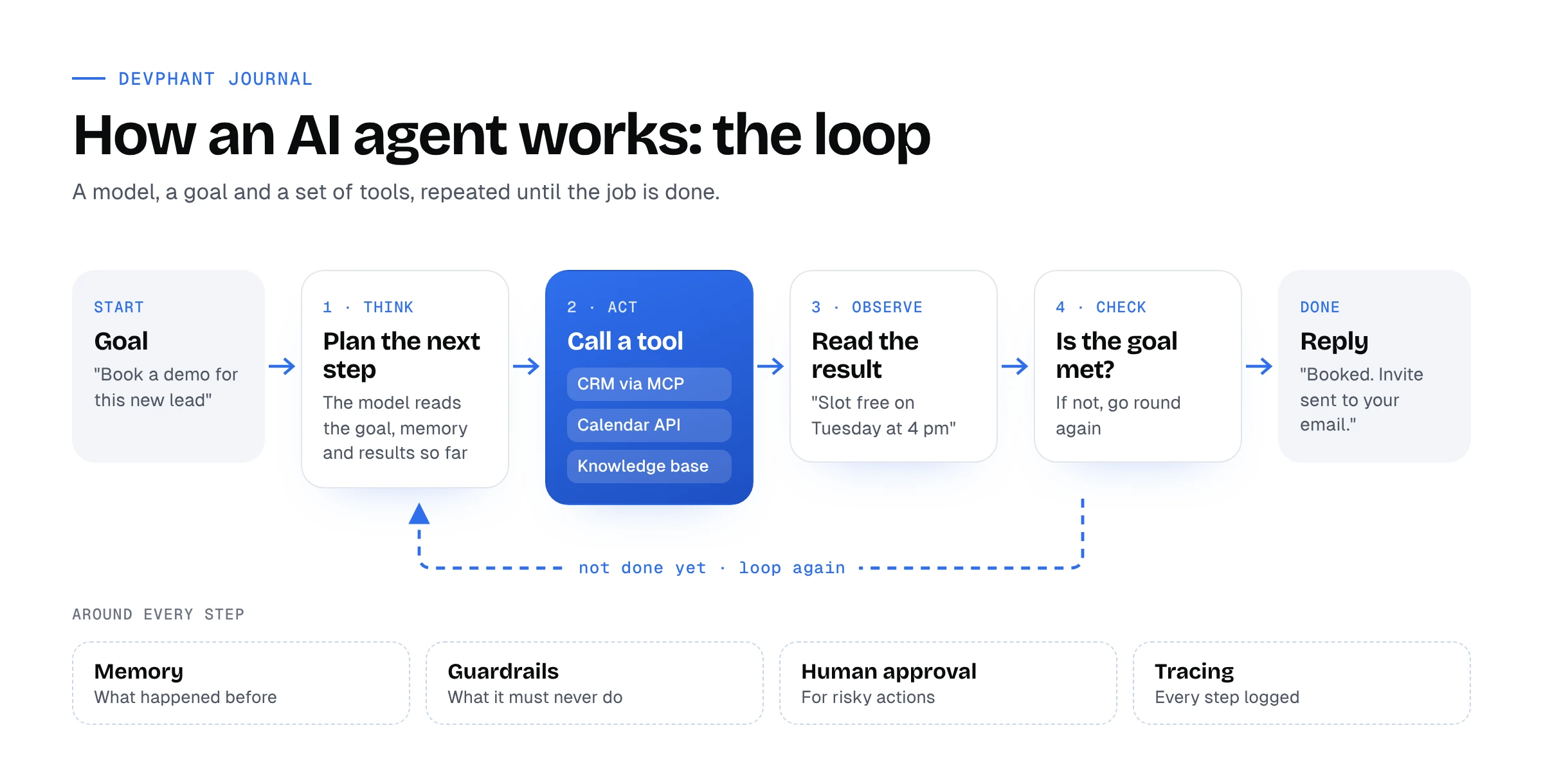
- Goal. A message or trigger arrives: “Book a demo for this new lead.”
- Think. The model reads the goal, what it remembers and what has happened so far, and decides the next step.
- Act. It calls a tool: look up the lead in the CRM, check the calendar, search the knowledge base.
- Observe. It reads what the tool returned: “Tuesday at 4 pm is free.”
- Check. Is the goal met? If not, it goes round again. If yes, it replies.
That is it. A simple question might take one loop. A real task, like qualifying a lead and booking a meeting, might take six or seven. Everything else in an agent exists to make this loop smart, grounded, safe and visible.
The stack, layer by layer
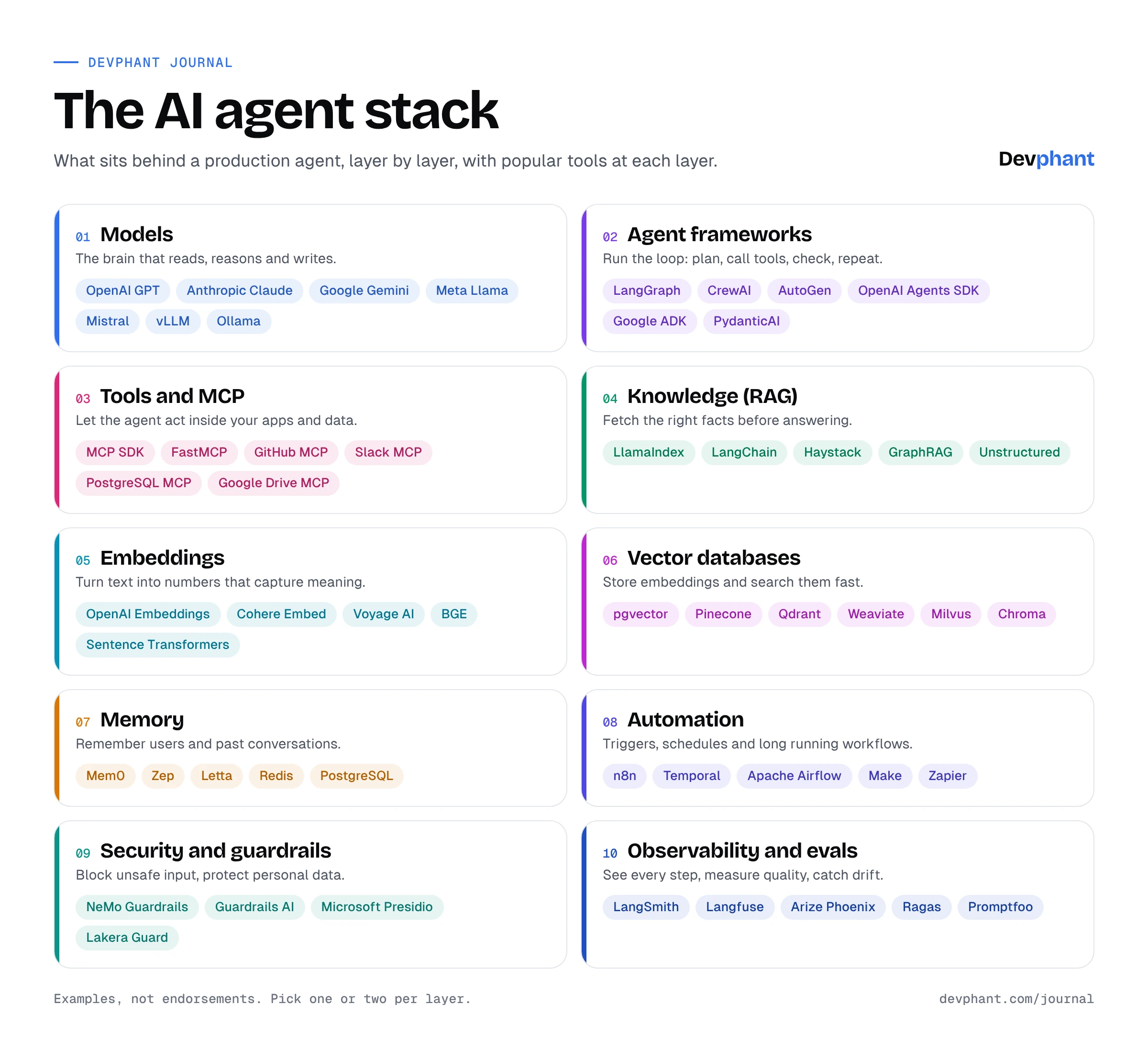
1. Models. The brain. A large language model such as GPT, Claude, Gemini, Llama or Mistral reads the situation and decides what to do. Teams that host their own open models serve them with tools like vLLM or Ollama.
2. Agent frameworks. The loop itself, as code. LangGraph, CrewAI, AutoGen, the OpenAI Agents SDK, Google ADK and PydanticAI handle the plumbing: passing results back to the model, retrying failed steps, running several agents that hand work to each other.
3. Tools and MCP. How the agent reaches the real world. The Model Context Protocol (MCP) is an open standard that lets any agent talk to any app through a common interface. There are ready made MCP servers for GitHub, Slack, Google Drive, PostgreSQL and many more, and libraries like FastMCP to build your own.
4. Knowledge (RAG). Retrieval augmented generation lets the agent look things up before it answers, so it quotes your policy instead of guessing. LlamaIndex, LangChain and Haystack do the retrieval. Unstructured turns PDFs and documents into clean text. GraphRAG connects facts across documents.
5. Embeddings. To search by meaning, text is turned into lists of numbers called embeddings. Similar ideas end up close together. Models from OpenAI, Cohere and Voyage AI, or open ones like BGE, do this.
6. Vector databases. Where those embeddings live, so the agent can find the closest matches in milliseconds. pgvector adds this to PostgreSQL. Pinecone, Qdrant, Weaviate, Milvus and Chroma are built for it.
7. Memory. What the agent remembers between conversations: the customer’s name, what they asked last week, what they prefer. Mem0, Zep and Letta manage it. Redis and PostgreSQL often store it.
8. Automation. Not every agent waits for a chat message. Workflows in n8n, Make or Zapier can start an agent when a form is filled or an email lands. Temporal and Apache Airflow keep long running jobs going, even if a server restarts halfway.
9. Security and guardrails. Rules the agent must never break. NeMo Guardrails and Guardrails AI check what goes in and out. Microsoft Presidio finds and masks personal data. Lakera Guard blocks prompt injection, where someone hides instructions inside a message or document to trick the agent.
10. Observability and evals. You cannot trust what you cannot see. LangSmith, Langfuse and Arize Phoenix record every step of every run. Ragas and Promptfoo score answers against a test set, so you know when a change makes things better or worse.
A real example: a lead agent on WhatsApp
Here is how the layers come together in an agent that qualifies investment leads on WhatsApp:
- A customer writes “I want to invest for my daughter’s education” in Hindi. Automation picks up the message and starts the agent.
- The model understands the intent and the language, and checks memory: this is a new customer.
- It asks for the amount and the time horizon, then searches the knowledge base through RAG for suitable products, answering only from approved content.
- It calls the calendar and CRM through MCP tools to book a call with an advisor and save the lead with a score.
- Guardrails stop it from promising returns or sharing anything it should not, and mask phone numbers in the logs.
- Every step is recorded by observability, so the team can review exactly what was said and why.
This is the pattern behind DIVA, our AI agents for WhatsApp, voice, email and chat.
Five lessons from building agents
- Start with one job. “Qualify leads and book meetings” beats “handle all customer queries”.
- Give it few, clear tools. Every extra tool is another way to pick the wrong one.
- Write the test before the agent. A set of real conversations with the right outcomes is how you know it works.
- Keep a person in the loop for risky actions. Refunds, account changes and anything regulated should need a human click.
- Watch cost and speed per task, not per call. An agent that loops ten times costs ten times as much.
You do not need every tool in this stack. Most production agents use one choice per layer, and many skip a few layers entirely at the start. What matters is knowing what each layer is for, so you add it when you need it.
Planning an agent for your team? Let’s talk.